
TheChats.me brings the conversations from your website chat, WhatsApp, Instagram and Messenger into one inbox, with an AI that answers for you and hands the conversation to your team when needed. This guide takes you from sign-up to your first conversation.
1. Create your account
- Open app.thechats.me/signup.
- Follow the sign-up steps: your details (name, e-mail and password) and your company’s.
- At the end you go straight into the panel. You do not need a card to start.
2. The three steps on Home
The first time you sign in, the Home screen shows three steps. Each one is ticked when it is done, and you can stop and come back whenever you like.
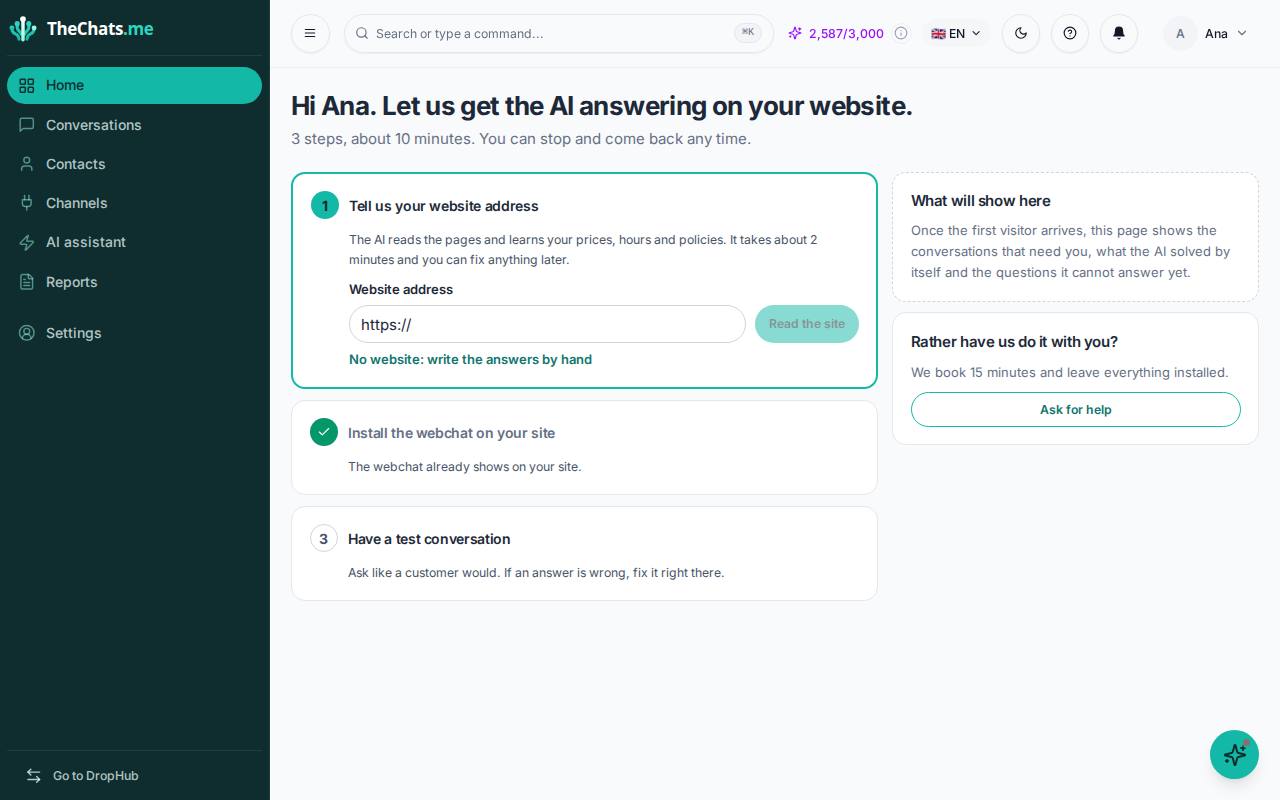
- Tell us your website address. The AI reads your pages and learns your prices, hours and policies. It takes about 2 minutes and you can correct everything afterwards. If you do not have a website, choose No website: write the answers by hand.
- Install the webchat on your site. One line of code, or we send the instructions to whoever manages your site. See Install the chat on your website.
- Have a test conversation. Click Try the AI and ask the way a customer would. If the answer is not right, you correct it right there.
Prefer to do it together? On Home, click Ask for help and we book 15 minutes to get everything installed.
3. Get to know the menu
- Home: what needs you now and the week at a glance.
- Conversations: where you reply to customers from every channel.
- Contacts: the people who talked to you, with their stage and score.
- Channels: where you connect the webchat, WhatsApp, Instagram and Messenger.
- AI Assistant: what the AI knows and how it answers.
- Reports: how the conversations went and what the AI resolved on its own.
- Settings: your plan, team, hours and the rest.
On any screen, the ? button at the top opens the Guide to this page, which walks you through each part of the screen.