
The AI Assistant answers customers in your website chat, WhatsApp, Instagram and Messenger using what it has learned about your business. When it does not know, it hands the conversation to a person.
Turn the AI on or off
At the top of the screen, AI answers customers turns the AI on or off on all channels at once. To choose channel by channel, use the AI answers column in Channels.
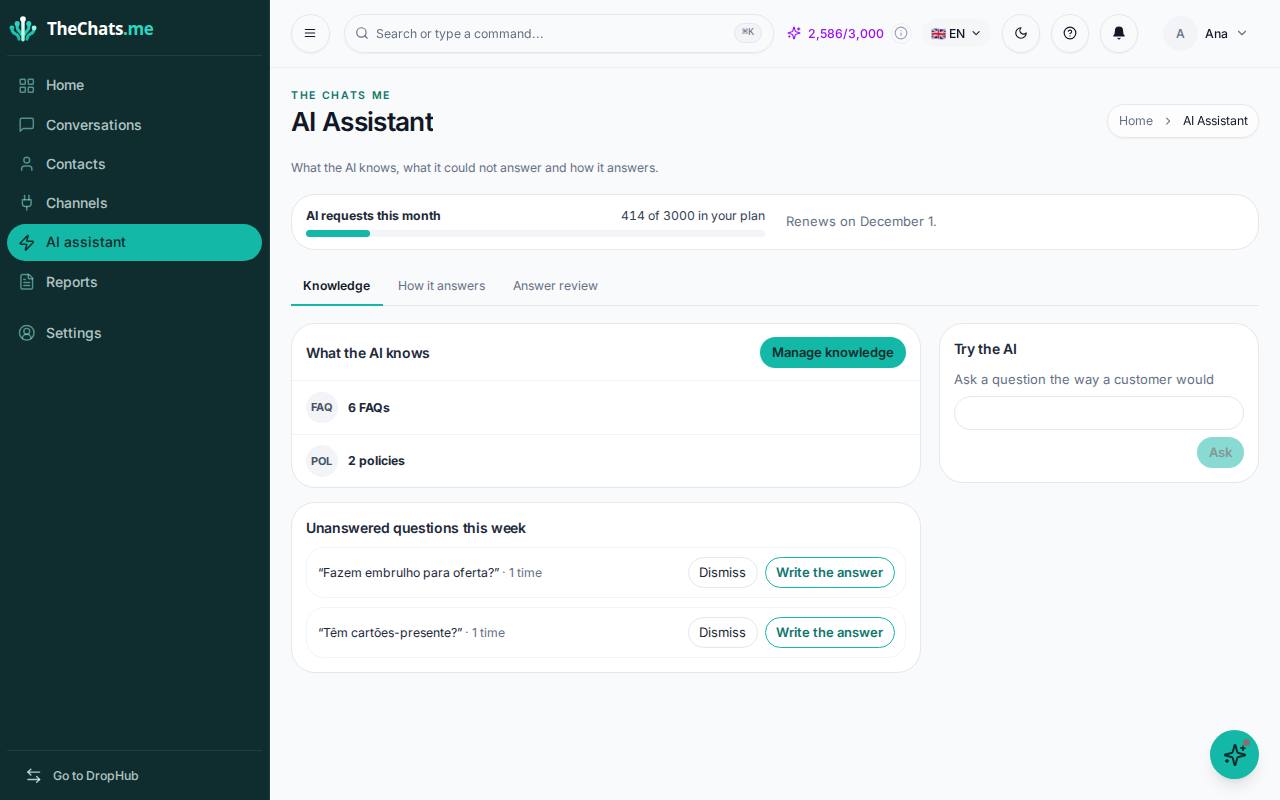
Next to it you see AI requests this month: how much of your plan’s limit you have used and when the counter restarts.
What the AI knows
In the Knowledge tab, What the AI knows shows the sources the AI uses: the pages of your website it has read, documents, frequently asked questions, products and policies.
- Click Manage knowledge to add or correct things.
- To read your website again after updating it, click Read again.
- Write your frequently asked questions and policies (exchanges, shipping, opening hours) in the words your customers use.
If the AI does not know anything yet, start by reading your website in Manage knowledge: it is the fastest way.
Unanswered questions
Unanswered questions this week lists what customers asked and the AI did not know. Click Write the answer, write it once and click Save answer: the AI now knows it. If the question does not matter, click Dismiss.
You can also teach from a conversation: see Answer conversations.
Try the AI
In Try the AI, ask a question the way a customer would and click Ask. If the answer is not right, click Correct this answer. If the AI says it would pass the conversation to a person, it does not have enough information about that topic.
The other tabs
- How it answers: the tone and way of answering, channel by channel.
- Answer review: what the AI answered to customers, so you can check it is right.
Good practice
- Start with the 10 questions you get most.
- State clearly what the AI must not promise (discounts, deadlines you do not control).
- Review the unanswered questions once a week.