
Meta, the owner of WhatsApp, Instagram and Messenger, only lets businesses write freely up to 24 hours after the customer’s last message. This is a Meta rule, not a TheChats.me one.
What happens on each channel
| Channel | After 24 hours |
|---|---|
| You can only write with a Meta-approved template. | |
| You cannot reply. The conversation reopens when the customer writes again. | |
| Messenger | You cannot reply. The conversation reopens when the customer writes again. |
| Website chat | No limit. |
A notice appears in the conversation when less than 1 hour is left and when the window closes.
Reopen a WhatsApp conversation with a template
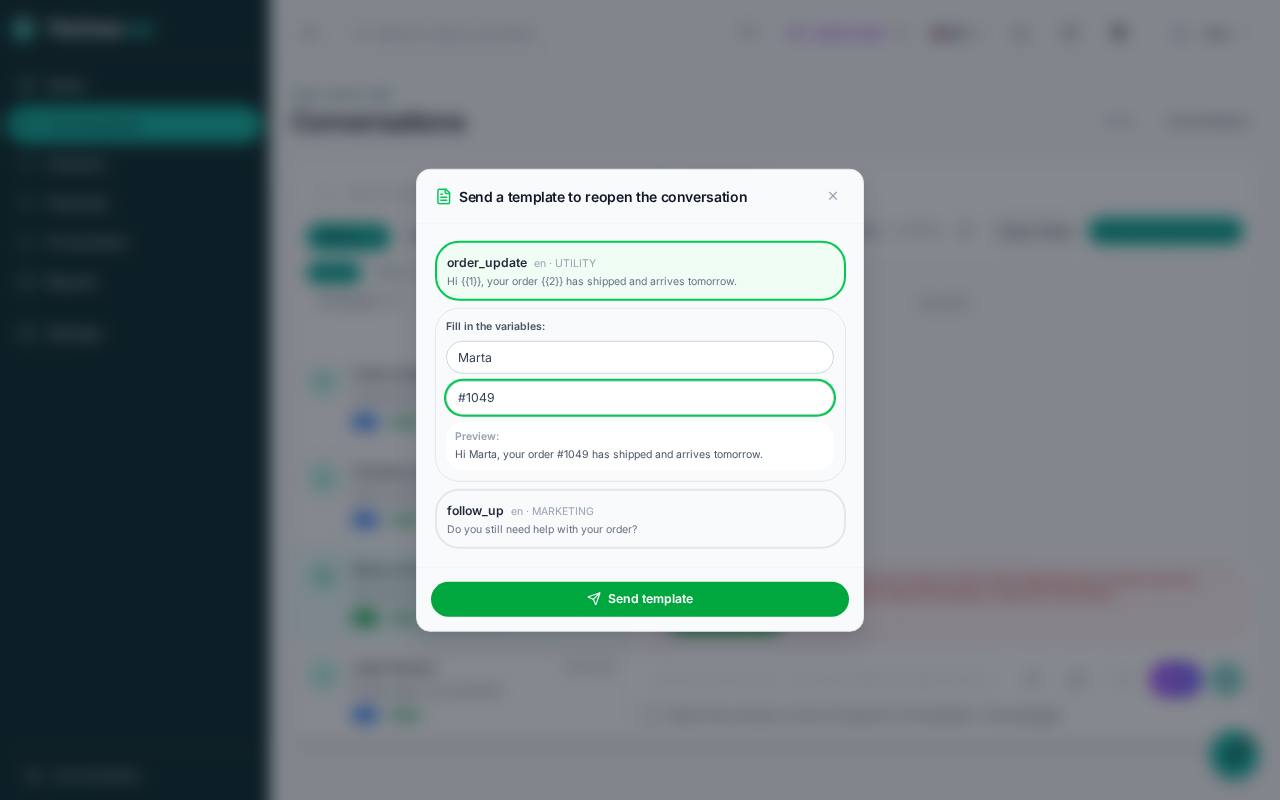
- Open the conversation. When the window is closed, the Send template button appears.
- Choose an approved template from the list.
- If the template has variables, such as
{{1}}for the name, fill them in. Below you see a preview of the message. - Click Send template. When the customer replies, the 24-hour window opens again.
Create templates
Templates are created in Channels › Manage, on the WhatsApp channel, under Configure › Templates. Meta reviews each one before it can be used; only approved ones appear in the conversation’s list.
Tips for getting Meta’s approval:
- Choose the right category: Utility for notices about an order or appointment; Marketing for promotions.
- Write a complete, clear message, with the variables in the middle of the text rather than at the start or end.
- Avoid asking for sensitive data.
Meta may charge for templates on your WhatsApp Business account, according to its price list. Replying within 24 hours does not use templates.
If something goes wrong
- No templates appear: you do not have approved templates yet. Create them in Configure › Templates and wait for Meta’s approval.
- I cannot reply on Instagram or Messenger: more than 24 hours have passed since the customer’s last message. The conversation reopens when they write again.