
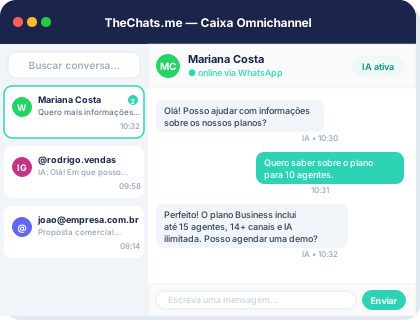
Product interface: a unified inbox to organize conversations and owners.
When it comes to providing customer service through WhatsApp, businesses have two options: the WhatsApp Business app or the WhatsApp Business API. Both have their own set of features and limitations, and choosing the right one can be crucial for your customer service strategy.
Introduction to WhatsApp Business App and API
The WhatsApp Business app is a free download available for small businesses and solo entrepreneurs. It allows you to respond to customer inquiries, create automated messages, and use quick replies. On the other hand, the WhatsApp Business API is designed for larger businesses and enterprises, offering more advanced features such as automated messaging, chatbots, and integration with CRM systems.
Key Features of WhatsApp Business App
The WhatsApp Business app offers the following features:
- Business profile: Create a professional profile for your business, including your address, hours of operation, and contact information.
- Automated messages: Set up automated messages to greet customers, provide basic information, or offer support.
- Quick replies: Use quick replies to respond to frequently asked questions or common customer inquiries.
- Labels: Organize conversations using labels, making it easier to manage and prioritize customer interactions.
Key Features of WhatsApp Business API
The WhatsApp Business API offers the following features:
- Automated messaging: Send automated messages to customers, including order updates, shipping notifications, and appointment reminders.
- Chatbots: Integrate chatbots to provide 24/7 customer support and help customers with basic inquiries.
- CRM integration: Integrate the WhatsApp Business API with your CRM system to access customer data and provide personalized support.
- Customized messaging: Send customized messages to customers based on their preferences, order history, and other relevant data.
Step-by-Step Guide to Choosing Between WhatsApp Business App and API
To choose between the WhatsApp Business app and API, follow these steps:
- Assess your business needs: Determine the size of your business, the volume of customer inquiries, and the level of automation you require.
- Evaluate your technical capabilities: Consider your technical expertise and resources to integrate and manage the WhatsApp Business API.
- Consider your budget: Calculate the costs associated with using the WhatsApp Business API, including any additional fees for messaging and integration.
- Check the limitations: Be aware of the limitations of each option, including the number of messages you can send, the types of messages you can send, and the level of customization available.
Checklist for Choosing Between WhatsApp Business App and API
Use the following checklist to help you make an informed decision:
- Do you have a small business with limited customer inquiries? (WhatsApp Business app)
- Do you have a large business with high volumes of customer inquiries? (WhatsApp Business API)
- Do you require advanced automation and customization features? (WhatsApp Business API)
- Do you have the technical expertise and resources to integrate and manage the WhatsApp Business API? (WhatsApp Business API)
- Are you looking for a cost-effective solution with limited features? (WhatsApp Business app)
Conclusion
Choosing between the WhatsApp Business app and API depends on your business needs, technical capabilities, budget, and the level of automation and customization you require. By following the step-by-step guide and using the checklist, you can make an informed decision that meets your customer service needs.
Frequently Asked Questions
What is the difference between the WhatsApp Business app and API?
The WhatsApp Business app is designed for small businesses and solo entrepreneurs, offering basic features such as automated messages and quick replies. The WhatsApp Business API is designed for larger businesses and enterprises, offering advanced features such as automated messaging, chatbots, and CRM integration.
Can I use both the WhatsApp Business app and API?
Yes, you can use both the WhatsApp Business app and API, depending on your business needs. However, you will need to apply for a separate business phone number for each option.
How do I get started with the WhatsApp Business API?
To get started with the WhatsApp Business API, you will need to apply for a business phone number, set up a verified business profile, and integrate the API with your CRM system or other messaging platform.
What are the costs associated with using the WhatsApp Business API?
The costs associated with using the WhatsApp Business API vary depending on the messaging volume and the level of integration required. You will need to contact a WhatsApp Business API provider, such as TheChats.me, to get a quote for your specific needs.
TheChats.me offers a range of pricing plans to suit your business needs, including the Micro, Grow, and Scale plans. With TheChats.me, you can centralize all your customer conversations in one place, automate responses, and integrate with your CRM system. To learn more about TheChats.me and how it can help you with your WhatsApp Business API needs, visit our website at https://thechats.me.