
WhatsApp for B2B sales: a queue that doesn't lose leads
How to structure a commercial queue on WhatsApp for B2B sales, with owners, tags and SLA, so hot leads stop going cold from poor organization.
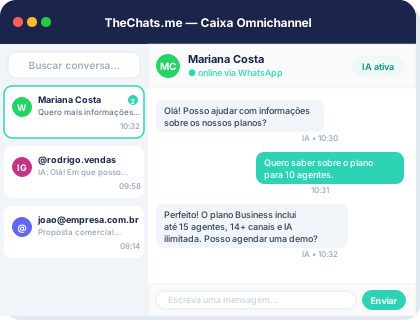
For a lot of sales teams, WhatsApp is already where deals actually get closed — not the website, not email. The problem is most of those teams still run WhatsApp like a personal chat: a shared number, improvised groups, a rep who goes on vacation and takes the conversation history with them. The result is hot leads going cold while nobody is sure who was supposed to reply.
The limits of WhatsApp without a sales structure
WhatsApp Web handles the basics — sending and receiving messages — but it doesn’t answer the questions every sales manager needs answered daily: how many leads came in today, who owns each one, how long they’ve been waiting, which ones are already qualified. Without those answers, the queue turns into a pile of disconnected conversations, and team growth only multiplies the chaos: more reps, more numbers, more chances for a lead to fall through the cracks.
The most common symptom is the duplicate lead: two reps reply to the same contact on different channels, or a contact starts from scratch because nobody could find the earlier conversation. That’s not a lack of effort from the team — it’s a lack of queue.
One unified queue with owners, tags and status
The structural fix is simple to describe and hard to do by hand: a single queue that brings WhatsApp through the official API together with Instagram, Facebook, Telegram, email and webchat in one place, with a visible owner, tags and status for the whole team.
That changes the question from “who saw this message first” to “who owns this lead right now” — and it lets the queue get reorganized as the operation grows, without relying on verbal agreements between reps.
In practice, that usually involves:
- Automatic or manual owner assignment per conversation
- Tags to segment by product, source or funnel stage
- Clear status (new, in progress, waiting on customer, closed)
- Full history visible to any rep who picks up the conversation
Automatic triage before handoff to a rep
Not every contact on WhatsApp is ready to talk to a salesperson. An AI layer can handle initial triage — understanding intent, collecting basic contact data and qualifying the lead before handing it to a human. That keeps the sales team from spending time on conversations that still need more information, and speeds up service for the ones who are already ready to buy.
The same AI layer can suggest replies and summarize long conversations, which helps a lot when a lead switches reps mid-process — nobody has to re-read the entire history to understand where things stand.
A mature sales queue isn’t about replying faster. It’s about making sure that, at any point, someone knows exactly who owns each lead — and what to do with it next.
SLA and real-time visibility
Organizing the queue is the first step; measuring what happens inside it is the second. Commercial tickets with real-time SLA tracking show where responses are slipping before a lead goes cold for good, and reports on volume, conversion and SLA give managers a view of the operation without having to ask every rep how their day is going.
That matters even more once WhatsApp stops being one rep’s channel and becomes a whole team’s channel: without visible SLAs, it’s easy for a lead to sit unanswered for days without anyone noticing.
From WhatsApp to CRM: context that closes deals
The last step is connecting that queue to a conversation CRM — contact, company, history and commercial context available to the whole team, not just whoever answered first. Integrations with tools like HubSpot and Pipedrive let WhatsApp stop being an island and start feeding the pipeline the team already uses to track opportunities.
That closes the loop: the lead comes in through WhatsApp, gets triaged and qualified by AI, lands in the right queue with the right owner, gets tracked against SLA, and the conversation history becomes sales context — not just a record of messages.
If your team is still running commercial WhatsApp on improvisation, it’s worth seeing how sales management works inside a single inbox, across the channels your operation already uses. For smaller teams just starting to structure this, the plans page shows the right entry point for your team size. And if you’d rather see the queue in action before deciding, you can book a demo with a setup similar to yours.