
Webchat That Converts: Form vs Live Chat
Why live webchat converts more visitors than a static contact form, and how history, AI triage, co-browsing and consent turn conversations into pipeline.
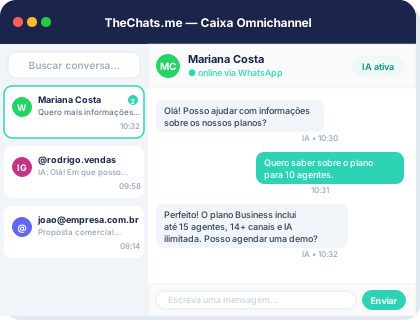
A contact form asks for a name, an email, and a message — then goes quiet for hours until someone replies. By the time that reply lands, the visitor has usually closed the tab and moved on to a competitor. Webchat fixes part of that by replacing the wait with a real-time conversation, but it only converts when it’s built to sell, not just installed as a decorative icon in the corner of the screen.
Why forms lose to conversation
A form works like a mailbox: the visitor drops in an intent and waits. Every hour between submission and reply drains the urgency that brought them to the site in the first place — and it’s common for them to have already found the same answer somewhere else. Live chat flips that: the question gets answered while the interest is still there. That doesn’t mean every visitor needs a human typing back instantly. It means the first response has to be immediate, even if full qualification happens a step later.
What makes webchat convert, not just exist
Having a chat widget on the site is table stakes. What separates webchat that converts from webchat that just adds volume is what happens between the click and the reply:
- Automatic triage: AI qualifies the lead before routing it to an agent, so the sales team isn’t burning time on basic support questions.
- Knowledge base with escalation: recurring questions get answered instantly by AI, and whatever it can’t handle escalates to a human automatically — without the visitor repeating themselves.
- Data collection during the conversation: name, email, and business context get captured as the person talks, not before, which removes the friction of asking for a full signup upfront.
The product page walks through what that looks like end to end: a visitor starts with a simple question and ends up sales-qualified, without ever filling out a ten-field form along the way.
From first click to full history
A conversation that converts rarely ends after one message. The visitor comes back days later, switches devices, or picks the thread back up with a different agent — and the chat history needs to follow, along with document and image sharing when the deal calls for it (a proposal, a screenshot, a contract). Without that context, every new interaction starts from zero, and the visitor feels like they’re talking to a different company each time.
That’s where the conversation CRM comes in: contact, company, and history stay available to the whole team, not just whoever answered the first message. A commercial ticket is born from the conversation with SLA tracked in real time, and the dashboard shows daily message stats — useful for seeing whether webchat is actually producing qualified conversations or just curious traffic.
Co-browsing and session recording: when seeing beats asking
For more technical deals or multi-step purchase flows on the site itself — a pricing calculator, a product configurator — describing the problem in text can be slower than just watching what the visitor sees. Co-browsing lets an agent follow along and guide them in real time, and session recording helps the team later understand where visitors get stuck before closing.
A form measures who filled out a field. A conversation measures who actually wanted to buy.
These features don’t replace the conversation — they back it up in the cases where explaining in text costs more time than solving it together.
Consent without friction
Converting more can’t come at the cost of ignoring how visitor data gets handled. A GDPR-compliant consent banner built into the widget documents data collection from the first click, without breaking the flow with a separate terms screen. The security page details how that consent ties into the rest of the operation — CRM, tickets, and audit trails — so conversion doesn’t turn into a compliance liability down the line.
Conclusion
A static form converts on the strength of whoever’s urgent enough to fill it out; a well-built webchat converts because it answers that urgency the moment it exists, qualifies the lead automatically, and keeps the context alive through to close. If your site still relies on a form alone, compare the available pricing plans or schedule a demo to see webchat working with queueing, AI, and CRM built in.