
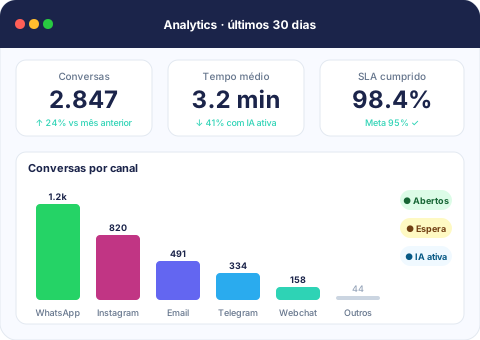
In SaaS, support is usually treated as a cost center to contain, not a revenue driver. Yet the person answering a paying customer’s tickets knows that account’s usage better than almost anyone else — they see the friction first, and they often spot an upsell or a churn risk before sales or customer success do. The problem is that this knowledge usually stays locked inside isolated tickets and never reaches whoever actually decides on expansion or retention.
A closed ticket isn’t the end of the story
Closing a ticket fast looks great on an SLA report, but it says nothing about why the account opened it in the first place. A customer who keeps asking how to get around a plan limit is signaling they’re ready to grow. A customer opening increasingly basic tickets about features they should already know is signaling risk. If every ticket is just closed and filed away, both signals disappear.
With conversation history tied to every contact and company, the full pattern becomes visible to the whole team — not just the last ticket, but months of context. That turns support from an isolated cost center into a source of commercial insight that sales and customer success can actually act on.
Automatic triage separates noise from signal
Most support volume in SaaS is repetitive: password resets, basic setup, onboarding questions. Handling all of it manually eats the time that should go to the conversation that genuinely needs a human.
- Knowledge base with escalation: recurring questions get answered automatically, with escalation to a human when the AI can’t resolve it (kb:escalate).
- Automatic triage and qualification: the AI organizes what the contact already shared before an agent has to ask everything again.
- Suggested replies and conversation summaries: whoever picks up the ticket understands the history in seconds instead of rereading the whole thread.
A SaaS company rarely loses an account because support was slow on one simple question — it loses it because nobody connected three similar tickets before the customer gave up.
Visible SLAs stop a big account from waiting in the same queue as everyone else
Not every ticket carries the same weight. An enterprise account with a contractual SLA can’t sit in the same queue as a trial user’s question. Tracking SLA in real time, with owners and tags on every conversation, lets teams prioritize without relying on someone remembering which customer is which.
That same data feeds quality and volume reports that show product and customer success where support is absorbing friction that should actually be fixed in the product — insight that rarely surfaces cleanly when tickets live scattered across different tools.
Integrations close the loop between support, sales, and billing
Support that’s disconnected from the rest of the operation only sees half the account. Connecting the inbox to HubSpot or Pipedrive puts conversation history in front of whoever handles renewal; connecting it to Stripe ties what a customer asks about to what they actually pay for, helping flag accounts whose plan no longer matches real usage — in either direction.
Real-time internal chat between support and sales keeps that handoff from depending on email or a ticket sitting idle while someone eventually notices it.
Conclusion
Support that only closes tickets quickly treats the symptom and hides the pattern. Support with centralized conversation history, automatic triage, and visible SLAs becomes a tool for catching at-risk accounts early and spotting the right moment to expand. Check out the resources built for SaaS teams and schedule a demo to see how this fits your customer base.