
WhatsApp, Instagram and Facebook are coming soon to TheChats.me. Today you can already create a free account and serve customers through the chat on your website. Start with website chat →

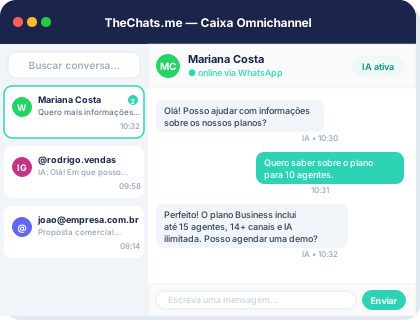
Product interface: a unified inbox to organize conversations and owners.
Using the same WhatsApp account with multiple agents can be a game-changer for businesses looking to streamline their customer support and improve response times. However, setting it up can be tricky. In this article, we'll walk you through the process, providing a step-by-step guide and expert tips to help you get started.
Understanding the Benefits
Using the same WhatsApp account with multiple agents offers several benefits, including:
- Improved response times: With multiple agents handling customer inquiries, you can respond faster and more efficiently.
- Increased productivity: By sharing the workload, agents can focus on other tasks and improve overall productivity.
- Enhanced customer experience: Customers receive timely and accurate responses, leading to increased satisfaction and loyalty.
Setting Up WhatsApp for Multiple Agents
To set up WhatsApp for multiple agents, follow these steps:
- Create a WhatsApp Business account: If you haven't already, create a WhatsApp Business account for your company. This will provide you with a unique phone number and access to WhatsApp's business features.
- Verify your business phone number: Verify your business phone number with WhatsApp to ensure that your account is legitimate and secure.
- Set up a WhatsApp Business API: Apply for a WhatsApp Business API to enable multiple agents to access your WhatsApp account.
- Choose a WhatsApp management platform: Select a reliable WhatsApp management platform, such as TheChats.me, to help you manage multiple agents and conversations.
- Configure agent roles and permissions: Set up agent roles and permissions to control access to your WhatsApp account and ensure that each agent can only view and respond to assigned conversations.
Configuring Agent Roles and Permissions
When configuring agent roles and permissions, consider the following:
- Agent roles: Define agent roles, such as customer support, sales, or marketing, to determine the types of conversations they can access.
- Conversation assignment: Assign conversations to specific agents or teams to ensure that each agent is working on the right conversations.
- Permission levels: Set permission levels to control what actions agents can perform, such as responding to messages, assigning conversations, or editing customer information.
Checklist for Setting Up WhatsApp for Multiple Agents
Use this checklist to ensure that you've completed all the necessary steps:
- Create a WhatsApp Business account
- Verify your business phone number
- Set up a WhatsApp Business API
- Choose a WhatsApp management platform
- Configure agent roles and permissions
- Assign conversations to agents or teams
- Set permission levels for each agent
Frequently Asked Questions
Here are some frequently asked questions about using the same WhatsApp account with multiple agents:
- Q: Can I use the same WhatsApp account with multiple agents without a WhatsApp Business API? A: No, you need a WhatsApp Business API to enable multiple agents to access your WhatsApp account.
- Q: How do I ensure that agents are responding to the right conversations? A: Use a WhatsApp management platform to assign conversations to specific agents or teams and set permission levels to control access.
- Q: Can I use multiple WhatsApp accounts with multiple agents? A: Yes, but it's recommended to use a single WhatsApp account with multiple agents to streamline customer support and improve response times.
Limitations and Considerations
When using the same WhatsApp account with multiple agents, consider the following limitations and considerations:
- Scalability: As your business grows, you may need to add more agents or adjust your WhatsApp management platform to accommodate increased conversation volume.
- Security: Ensure that your WhatsApp management platform provides robust security features to protect customer data and prevent unauthorized access.
- Integration: Consider integrating your WhatsApp account with other customer support channels, such as webchat or social media, to provide a seamless customer experience.
Next Steps
If you're looking to streamline your customer support and improve response times, consider using the same WhatsApp account with multiple agents. With the right WhatsApp management platform, such as TheChats.me, you can easily set up and manage multiple agents, assign conversations, and track performance. Take the first step today and discover how TheChats.me can help you improve your customer support and grow your business.