
How to route conversations between agents automatically
Automate conversations routing between agents with our step-by-step guide. Improve customer service efficiency and reduce response times.
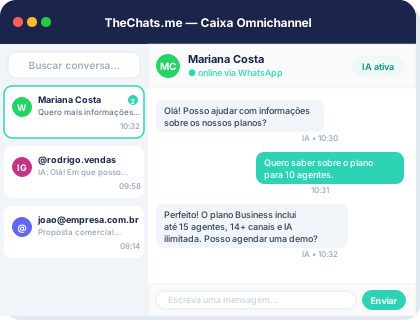
Product interface: a unified inbox to organize conversations and owners.
To efficiently manage customer inquiries, it's crucial to route conversations between agents automatically. This ensures that customers receive timely and relevant responses, enhancing their overall experience. In this article, we'll explore a step-by-step approach to automating conversation routing.
Understanding the Benefits
Automating conversation routing offers several benefits, including:
- Reduced response times: By routing conversations to the most suitable agent, you can ensure that customers receive prompt responses.
- Improved efficiency: Automation saves time and effort, allowing agents to focus on complex issues that require human intervention.
- Enhanced customer experience: Relevant and timely responses lead to increased customer satisfaction and loyalty.
Step-by-Step Guide to Automating Conversation Routing
To automate conversation routing, follow these steps:
- Define routing criteria: Establish clear criteria for routing conversations, such as language, location, or inquiry type.
- Configure agent profiles: Create profiles for each agent, including their expertise, languages, and availability.
- Set up routing rules: Use your defined criteria and agent profiles to create routing rules. For example, you can route Spanish-speaking customers to agents who speak Spanish.
- Implement automation tools: Utilize automation tools, such as chatbots or AI-powered routing systems, to streamline the routing process.
- Monitor and adjust: Continuously monitor the routing process and make adjustments as needed to ensure optimal performance.
Example Configuration
Suppose you have a customer service team with agents who speak different languages. You can configure your routing rules to direct customers to agents who speak their preferred language.
- English-speaking customers: Route to Agent A or Agent B
- Spanish-speaking customers: Route to Agent C or Agent D
Checklist for Automating Conversation Routing
To ensure a smooth implementation, use the following checklist:
- Define clear routing criteria
- Configure agent profiles
- Set up routing rules
- Implement automation tools
- Monitor and adjust the routing process
Limitations and Considerations
While automating conversation routing offers numerous benefits, it's essential to consider the following limitations and potential issues:
- Complexity: Routing rules can become complex, leading to errors or misrouting.
- Agent availability: Agents may not always be available, which can impact routing efficiency.
- Customer preferences: Customers may have specific preferences or requirements that are not accounted for in the routing rules.
Frequently Asked Questions
What is the best way to define routing criteria?
The best way to define routing criteria is to analyze your customer base and identify the most common factors that influence their inquiries, such as language or location.
How can I ensure that my routing rules are effective?
To ensure effective routing rules, continuously monitor the routing process and make adjustments as needed. Additionally, consider using automation tools to streamline the process.
What are the potential risks of automating conversation routing?
Potential risks include complexity, agent availability, and customer preferences. It's essential to carefully consider these factors when implementing automation.
Next Steps
To improve your customer service efficiency and reduce response times, consider automating conversation routing. By following the step-by-step guide and checklist outlined in this article, you can create an effective routing system that enhances the customer experience. For more information on automation tools and customer service solutions, visit TheChats.me.
How to apply this guide without disrupting operations
Treat How to route conversations between agents automatically as a small operational project with an owner, deadline and success criteria. Before changing tools, record one week of volume by channel, peak hours, common contact reasons and conversations without an owner. This baseline prevents decisions based on impressions alone.
Start with the highest-impact queue or channel. Define who receives each conversation, the response target, handoff conditions and the context that must travel with a handoff. Run the pilot with a small group, review real conversations without exposing sensitive data and correct unclear rules before expanding.
Copyable setup checklist
- Current channels, volumes and coverage hours are recorded.
- Each conversation type has a queue and primary owner.
- A backup owner and escalation rule are defined.
- SLA targets reflect priority and service hours.
- Quick replies have an approved source and review owner.
- Handoffs include history, reason and next action.
- Sensitive cases require a human owner.
- Agents know how to report a rule that does not work.
Validate after rollout
Compare equivalent periods before and after the pilot. Track first-response time, unowned conversations, SLA breaches, repeated handoffs and resolution. For sales, add qualified opportunities and progression to the next stage. For support, use resolution and reopen rates. Attribute improvement to the new flow only after considering volume, coverage and team composition.
Document limitations and review the process every two weeks at first. If agents frequently work around a rule, investigate before enforcing it: the queue may be wrong, the SLA unrealistic or triage context incomplete. The goal is a process people can execute and managers can audit.