
How to centralize WhatsApp, Instagram and email in one inbox
Learn how to centralize WhatsApp, Instagram, and email in one inbox, streamlining customer service and improving response times.
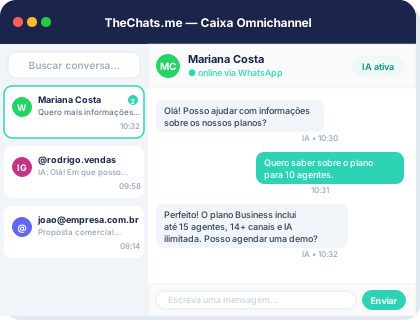
Product interface: a unified inbox to organize conversations and owners.
Centralizing customer communication channels is crucial for businesses that want to provide excellent customer service. With the rise of social media and messaging apps, customers expect to be able to reach out to businesses through various channels. In this article, we will show you how to centralize WhatsApp, Instagram, and email in one inbox, making it easier to manage customer inquiries and improve response times.
Understanding the Importance of Centralization
Centralization of customer communication channels is essential for several reasons. Firstly, it helps to reduce the complexity of managing multiple channels, which can lead to missed messages, delayed responses, and a poor customer experience. Secondly, centralization enables businesses to have a single view of customer interactions, making it easier to track conversations and provide personalized support.
Step-by-Step Guide to Centralization
To centralize WhatsApp, Instagram, and email in one inbox, follow these steps:
Step 1: Choose a Centralization Platform
Select a platform that can integrate with all three channels. TheChats.me is a popular option that offers a centralized inbox for WhatsApp, Instagram, and email, along with other channels.
Step 2: Connect Your Channels
Connect your WhatsApp, Instagram, and email accounts to the centralization platform. This will enable you to receive messages from all three channels in one inbox.
Step 3: Configure Your Inbox
Configure your inbox to prioritize messages, assign tasks to team members, and set up automated responses.
Step 4: Train Your Team
Train your customer service team to use the centralized inbox and respond to messages from all three channels.
Checklist for Centralization
Here is a checklist to ensure a smooth centralization process:
- Choose a centralization platform that integrates with all three channels
- Connect your WhatsApp, Instagram, and email accounts to the platform
- Configure your inbox to prioritize messages and assign tasks
- Train your customer service team to use the centralized inbox
- Monitor and evaluate the performance of your centralized inbox
Examples of Configuration
Here are some examples of how you can configure your centralized inbox:
- Set up automated responses for common inquiries
- Assign tasks to team members based on their expertise
- Prioritize messages from VIP customers
- Use tags and filters to categorize messages
Frequently Asked Questions
Here are some frequently asked questions about centralizing WhatsApp, Instagram, and email:
Q: Will centralizing my channels reduce the complexity of managing customer inquiries?
A: Yes, centralizing your channels will reduce the complexity of managing customer inquiries and improve response times.
Q: Can I use a centralization platform to integrate with other channels besides WhatsApp, Instagram, and email?
A: Yes, many centralization platforms offer integrations with other channels, such as Facebook Messenger, Twitter, and more.
Q: How do I train my customer service team to use a centralized inbox?
A: You can train your customer service team by providing them with documentation, training sessions, and hands-on experience with the centralized inbox.
Limitations and Considerations
While centralizing WhatsApp, Instagram, and email in one inbox can be beneficial, there are some limitations and considerations to keep in mind:
- Integration limitations: Some centralization platforms may not offer integrations with all three channels or may have limitations on the number of messages that can be processed.
- Cost: Centralization platforms can be costly, especially for large businesses or those with high message volumes.
- Security: Centralizing customer communication channels can also raise security concerns, such as data breaches or unauthorized access.
Next Steps
If you're interested in centralizing your WhatsApp, Instagram, and email channels, here are the next steps to take:
- Research centralization platforms that integrate with all three channels
- Contact TheChats.me to learn more about their centralized inbox solution
- Evaluate the costs and benefits of centralizing your channels
- Train your customer service team to use the centralized inbox
By following these steps and considering the limitations and considerations, you can centralize your WhatsApp, Instagram, and email channels and improve your customer service experience.