
Clinic scheduling and follow-up without the chaos
How clinics organize scheduling, confirmations and patient follow-up in one inbox, without losing a WhatsApp, Instagram or email message.
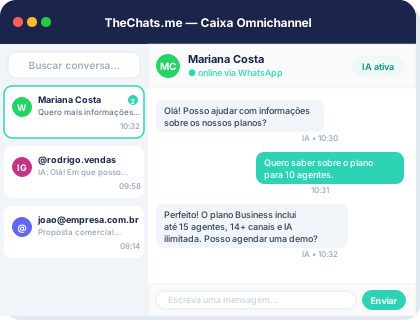
In a lot of clinics, scheduling still depends on a front-desk person switching between WhatsApp, a spreadsheet and the landline. It works fine until two messages land at the same time, a confirmation slips through, and a patient shows up for an appointment that had already been rescheduled. The problem is rarely the team not trying hard enough — it’s the lack of one place where every patient conversation has an owner, a status and a history.
Why scheduling turns chaotic once channels multiply
Patients don’t stick to one channel when contacting a clinic. Some send WhatsApp, others fill out the website form, others call or email. When each channel is monitored separately, the team loses track of what’s already been answered and what’s still open. An inbox that brings WhatsApp through the official API, Instagram, Facebook, email and webchat into one queue — with an owner, a tag and a status per conversation — fixes the problem at the root: there’s no more “that message lost in a closed tab.”
It also prevents a common failure mode: two staff members answering the same patient with different information about the same appointment, simply because each one only saw the channel open on their own screen.
Confirmations and reminders that don’t rely on someone remembering
No-shows and late arrivals are expensive for a clinic — that time slot doesn’t come back. Most of this gets solved with process, not with more headcount:
- A queue organized by status: conversations marked “awaiting confirmation” stay visually separate from “confirmed” and from “rescheduling in progress.”
- Automatic triage: a patient message asking to reschedule can be identified and routed to the right person before a human has to read through everything manually.
- Conversation summaries: when a patient has exchanged messages across several days, the front desk doesn’t need to scroll the entire history to understand what was already agreed.
A clinic doesn’t lose patients for lack of care — it loses them for lack of a place to record what was already promised to each one.
Follow-up after the visit is also customer service
Scheduling is only half the job. Returns, follow-up exams and reassessments depend on someone remembering to reach out — and that’s exactly where most clinics lose patients without noticing it’s happening. With a conversation CRM that keeps contact, history and context together, the team can filter who had an appointment a certain number of weeks ago and still hasn’t had a follow-up scheduled, instead of relying on whoever handled that patient back then remembering to do it.
The same applies to people who reached out, asked about a procedure, and never moved forward. Without a centralized history, that patient simply drops off the priority list — even though they already showed real interest.
Webchat on the site: answering questions without leaving the page
Many people research a clinic before deciding to call or book. A live chat widget on the website, with saved history and a built-in consent banner, lets a visitor ask about a procedure, pricing or availability without opening WhatsApp or making a call. That reduces the friction between “researching” and “scheduling” — and the conversation lands in the same queue as the rest of the clinic’s inbox, with the same shared history.
Daily message statistics on the dashboard also help the team understand which hours see the most demand, which is useful for planning how many staff members need to be available per shift.
Patient data needs extra care
Health information is sensitive data, and how it’s handled in customer service matters just as much as how it’s handled in the medical record. Role-based permissions, audit logs and a clear process for exporting or deleting a contact’s data aren’t optional overhead — they’re part of running a clinic responsibly. It’s worth reviewing how this is structured on the security page before scaling up conversation volume.
Conclusion
Organizing scheduling and patient follow-up in a single inbox, with a status-based queue, a central history and automatic triage, is what separates a clinic that cares well for patients from one that only replies quickly when there’s spare time. Check out the resources built for clinics and schedule a demo to see how it fits your operation’s actual workflow.